How Do You Refresh Your Browser - Chrome, Firefox, Safari
Select the browser of your interest: Google chrome Firefox Safari Internet explorer/Edge When you return to a site you’ve visited recently, you’ll notice it loads much faster than it did when you f...

25+ years in digital marketing | StoryBrand Certified Guide | HubSpot Platinum Partner | Author of 'Building a Business That Lasts'
Select the browser of your interest:
When you return to a site you’ve visited recently, you’ll notice it loads much faster than it did when you first visited it. This is because your browser has saved and stored a copy of the website on your computer. The browser does this because it’s a lot faster for your browser to load the website locally instead of requesting and downloading the website from the internet again.
This copy, which includes images and information, is known as the cache. Merriam-Webster defines cache as “a computer memory with very short access time used for storage of frequently or recently used instructions or data.”
When too much information gets stored in the cache, it can become overwhelming for your connection and your computer. That’s when it’s time to complete a hard refresh.
Why Would I Need to Hard Refresh My Browser Cache?
The disadvantage of storing pages to the browser’s cache is that changes made to the website aren't always immediately visible to you. This is normal, and many of our web design clients notice that when we make changes to their websites, they can’t see the changes when they visit the site!
This is because their browsers have stored an older cached version of the site. In this situation, you can hard refresh your browser to clear the cache and download the new content. Performing a hard refresh is easy and the commands vary depending on what browser and operating system you’re using.
Clicking on the refresh icon in the address bar of your browser is NOT the same as a hard refresh and won’t produce the same results.
When you’re ready to complete a hard refresh on your browser, make sure you’re viewing the website before using the hot keys below.
How Do You Hard Refresh Google Chrome?
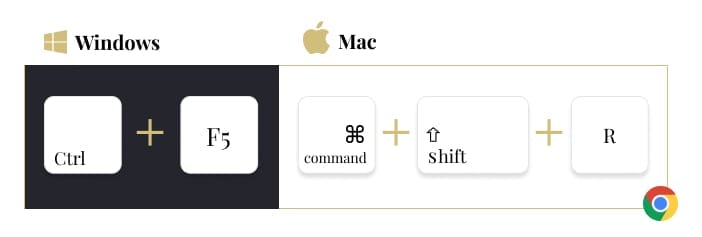
- For Windows users:
Hold down Ctrl and then press F5 on your keyboard. - For Mac users:
Hold down ⌘ Cmd and ⇧ Shift and then press R on your keyboard.

How Do You Hard Refresh Firefox?
- For Windows users:
Hold down Ctrl and then press F5 on your keyboard. - For Mac users:
Hold down ⌘ Cmd and ⇧ Shift and then press R on your keyboard.

How Do You Hard Refresh Safari?
- Empty Cache: Go to Safari > Empty Cache, or hit Opt + ⌘ Cmd + E.

- To refresh: click the refresh button on the address bar or press ⌘ Cmd + R.

How Do You Hard Refresh Internet Explorer/Microsoft Edge?
Hold down Ctrl and then press F5 on your keyboard.

Different browsers have different ways of completing a hard refresh, so make sure you choose the right method for your browser.
Should You Hard Refresh Your Browser?
If you haven’t completed a hard refresh on your browser before, then it’s probably time. It’ll wipe out all the old information from every website you’ve visited so that next time you visit it, you’ll get the most up-to-date information, which is what you want! If your website could use some updating so your future visitors get all the latest updates from your business, contact our team today.
Ready to Grow Your Business?
Put these insights into action with our expert team. We help businesses like yours achieve measurable results.