Social Media
How to Multiply Your Social Media Content
Creating content for social media is a major issue for many people. Understanding how you can create massive amounts of content from a single piece of content (content multiplication) is key. In this ...

25+ years in digital marketing | StoryBrand Certified Guide | HubSpot Platinum Partner | Author of 'Building a Business That Lasts'
TL;DR
Creating content for social media is a major issue for many people. Understanding how you can create massive amounts of content from a single piece of content (content multiplication) is key. In this ...
4 min read
Share:
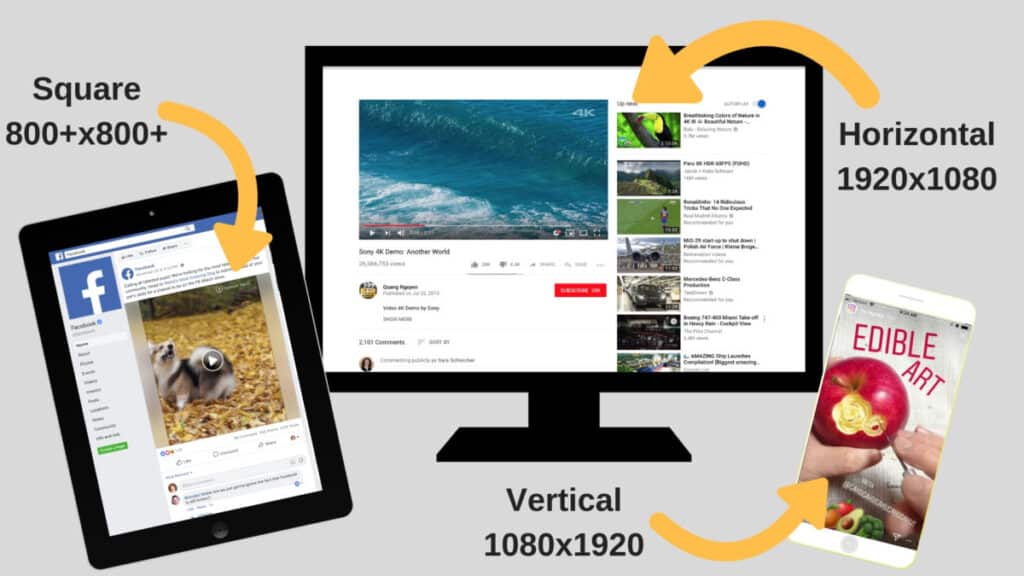
Creating content for social media is a major issue for many people. Understanding how you can create massive amounts of content from a single piece of content (content multiplication) is key. In this post, I'll explain how a single video or live talk can be turned into 10+ pieces of valuable content that will help with social media and search engine optimization.
 Tools: If you need to edit your videos in a hurry, or you’re on a shoestring budget, you can quickly crop and export your video in multiple sizes using the InShot app.
Start with Your Content Building Blocks
The key starting element of your content should be a video. If you already have one in mind, like a live talk or an interview, then you’ve got a good head start. But let’s say that you don’t. Start by shooting a short 3-5 minute video of you or another spokesperson talking about a topic your followers are passionate about. That unedited video will be your starting point. Note: You should shoot your video in horizontal (landscape) format, but keep in mind that you’ll later be cropping the video into square and vertical formats, so you’ll want to position your spokesperson with that in mind. Next, you’ll need a transcript of your video. You can transcribe the video manually, but I recommend using a transcription service like Rev.com to save you time. That transcription will be used to add video captions, create quote cards, repurpose for longer text posts, and maybe even use for blog posts.Edit Your Video for Multiple Social Media Platforms
Now, here’s where the content multiplication magic really starts. You’ll need to edit your video into multiple versions that fit the ideal size and dimensions for each social media platform. YouTube still runs on the traditional landscape format, so save a version with the dimensions of 1920x1080. For Facebook and Instagram, the square video is king. In a case study, square videos resulted in up to 30-35% higher video views and an 80-100% increase in engagement. Instagram TV is in its own category since it will only accept vertical videos. You’ll need to crop one version of your video into 1080x1920 vertical format. Keep in mind that Instagram TV’s time caps out at 10 minutes. Tools: If you need to edit your videos in a hurry, or you’re on a shoestring budget, you can quickly crop and export your video in multiple sizes using the InShot app.
Create Quote Cards with Quotables
Once your videos are finalized, it’s time to take a look back through your video transcript and identify a few really solid sound bites. These should be short, impactful statements. After you’ve identified at least two heavy-hitters, you’ll take those quotes and create text graphics using those quotes. You’ll want to create two versions of your quote cards: Version 1: Square quote cards for Facebook and Instagram (800x800) Version 2: Vertical quote cards for Instastories (1080x1920) You can overlay the quotes over a headshot of your speaker (preferred), or you can simply put them on a background that fits with your design colors. Tools: If you want to create quick graphics, a tool like Canva or Adobe Spark can streamline the process.Organize, Schedule, and Upload
With all this content to keep track of, it’s easy to get disorganized. Once you’ve created all your videos and image files, make sure you’re storing them in labeled folders where you can quickly identify which video is for what platform and which pieces have already been published. Okay! You’re organized now. What’s next? Well, you can’t just dump all = your beautiful content on your followers all at once. Now, you’ll create a schedule. You can do this with a Google Calendar, or an Excel Spreadsheet. To ensure your followers don’t tune out, stagger your posts at least a week apart (longer if you can). Here’s what that might look like:- Facebook Video Post: January 16
- YouTube Video Post: January 30
- Instagram TV Video Post: February 6
- Instastories Quote Card #2: February 13
- Instagram Quote Card #1: February 20
- Facebook Quote Card #2: February 27
- Instastories Quote Card #1: March 6
- Instagram Video Post: March 13
- Facebook Quote Card #1: March 20
- Instagram Quote Card # 2: March 27
Ready to Grow Your Business?
Put these insights into action with our expert team. We help businesses like yours achieve measurable results.