SEO
How to Create a Google Business Review Link & Get More Reviews
Update 12/4/19: Get the Google reviews link straight from your Google My Business page Google has released a newer and much easier way to generate a direct link to your Google Reviews. While the old m...

25+ years in digital marketing | StoryBrand Certified Guide | HubSpot Platinum Partner | Author of 'Building a Business That Lasts'
TL;DR
Update 12/4/19: Get the Google reviews link straight from your Google My Business page Google has released a newer and much easier way to generate a direct link to your Google Reviews. While the old m...
4 min read
Share:
Update 12/4/19: Get the Google reviews link straight from your Google My Business page Google has released a newer and much easier way to generate a direct link to your Google Reviews. While the old method will still work, please follow the below steps to create a direct link within your Googly My Business admin panel. To create your direct link:
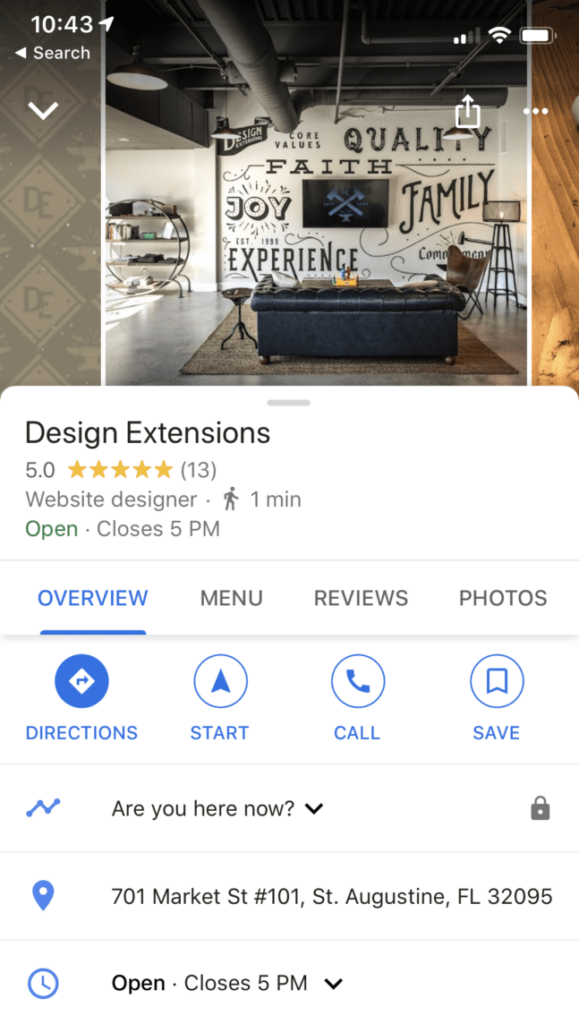
 Done. The pop-up even allows you to share directly to Facebook, Twitter or WhatsApp. Now when customers click the link, a window will open in their browser or Google Maps app. They’ll be able to rate your business and leave a review instantly. Here is our link: https://g.page/designext/review?gm Google My Business is an extremely important and powerful tool provided for free to businesses by Google. Yes, it's 100% free. Why is Google My Business so powerful? With 80% of local business searches happening on mobile devices, you have the ability to capture customers right when they need you. When your customer needs to buy a product or service locally, they'll pull out their smartphone and Google whatever it is that they are looking for, calling or visiting your website instantly. Like so: [caption id="attachment_12189" align="aligncenter" width="579"]
 Screenshot of Business Builders on Google Business[/caption] Creating and verifying your Google My Business allows potential customers to call you when they’re motivated. Another very real benefit? Customer reviews. They’re powerful. They provide social proof and honest testimonials to your business, which increases trust and authority. The one problem: it takes a few clicks to get to the “Create Review” section. Too many clicks. It's a confusing process for the average person. These are only a couple of examples of friction. You don’t want friction when we ask for a customer review at your Google My Business link. Here’s how to create a direct link to send to your customers, making it easy for them to leave that valuable Google review.
 Now you’re going to want to add your Place ID to the following URL to create the direct link: https://search.google.com/local/writereview?placeid=<place_id> Using the example above, the URL with the Place ID added would be: https://search.google.com/local/writereview?placeid=ChIJ3ZHiqxQr5IgRJ22BEk-g3Hs Now when customers click the link, a window will open in their browser. They’ll be able to rate your business and leave a review instantly. Easy as that. Here are a couple of extra points to think about when getting your Google My Business Customer Reviews together:
- Sign in to your Google Account that manages your GMB page. https://www.google.com/business/
- On the dashboard, just scroll to the Get more reviews box
- Copy the provided link
Done. The pop-up even allows you to share directly to Facebook, Twitter or WhatsApp. Now when customers click the link, a window will open in their browser or Google Maps app. They’ll be able to rate your business and leave a review instantly. Here is our link: https://g.page/designext/review?gm Google My Business is an extremely important and powerful tool provided for free to businesses by Google. Yes, it's 100% free. Why is Google My Business so powerful? With 80% of local business searches happening on mobile devices, you have the ability to capture customers right when they need you. When your customer needs to buy a product or service locally, they'll pull out their smartphone and Google whatever it is that they are looking for, calling or visiting your website instantly. Like so: [caption id="attachment_12189" align="aligncenter" width="579"] Screenshot of Business Builders on Google Business[/caption] Creating and verifying your Google My Business allows potential customers to call you when they’re motivated. Another very real benefit? Customer reviews. They’re powerful. They provide social proof and honest testimonials to your business, which increases trust and authority. The one problem: it takes a few clicks to get to the “Create Review” section. Too many clicks. It's a confusing process for the average person. These are only a couple of examples of friction. You don’t want friction when we ask for a customer review at your Google My Business link. Here’s how to create a direct link to send to your customers, making it easy for them to leave that valuable Google review.
Create a Google My Business Direct Link to Review
To create a link, you’ll need to get the Place ID for your business. To get your Place ID:- Go to the Google Places API. Just click the link and you’ll be taken to the search.
- Enter your business information in the “Enter a location” field at the top of the map.
- Click your business name in the list that appears.
- Your Place ID will appear on the map beneath your business name.
Now you’re going to want to add your Place ID to the following URL to create the direct link: https://search.google.com/local/writereview?placeid=<place_id> Using the example above, the URL with the Place ID added would be: https://search.google.com/local/writereview?placeid=ChIJ3ZHiqxQr5IgRJ22BEk-g3Hs Now when customers click the link, a window will open in their browser. They’ll be able to rate your business and leave a review instantly. Easy as that. Here are a couple of extra points to think about when getting your Google My Business Customer Reviews together:
- The best time to ask your customers to leave a review is shortly after their purchase. Send a follow-up email asking about their experience with your product, business, or service.
- Be simple and direct in how you ask for the review.
- Never incentivize customers with discounts of other offers for their review. This could get your business banned by Google.
- Ask your customers to focus on one point in their experience.
Ready to Grow Your Business?
Put these insights into action with our expert team. We help businesses like yours achieve measurable results.